
Regex Replace: 10 Practical Examples You Can Reuse
Regex replace becomes useful when the text has a repeatable shape but the exact values change. The safest way to write one is to start with a small sample, mark the part that should change, and test the replacement against a case that should not change. The examples below use short patterns you can adapt rather than one giant expression that tries to understand everything.
Before you replace anything
- Work on a copy of the text or commit the file first.
- Write one example that should match and one that should not.
- Decide whether the replacement should affect one match or every match.
- Check the syntax of the engine you are actually using.
Ten patterns worth keeping
1. Collapse repeated spaces
Pattern: \s+. Replacement: one space. This is useful after copying text from a PDF, but trim the final result separately if leading or trailing whitespace matters.
2. Remove spaces around commas
Pattern: \s*,\s*. Replacement: , . It normalizes a list without changing the comma itself.
3. Wrap a ticket number
Pattern: \b(TKT-\d+)\b. Replacement: [\1]. The group keeps the identifier while adding visible brackets.
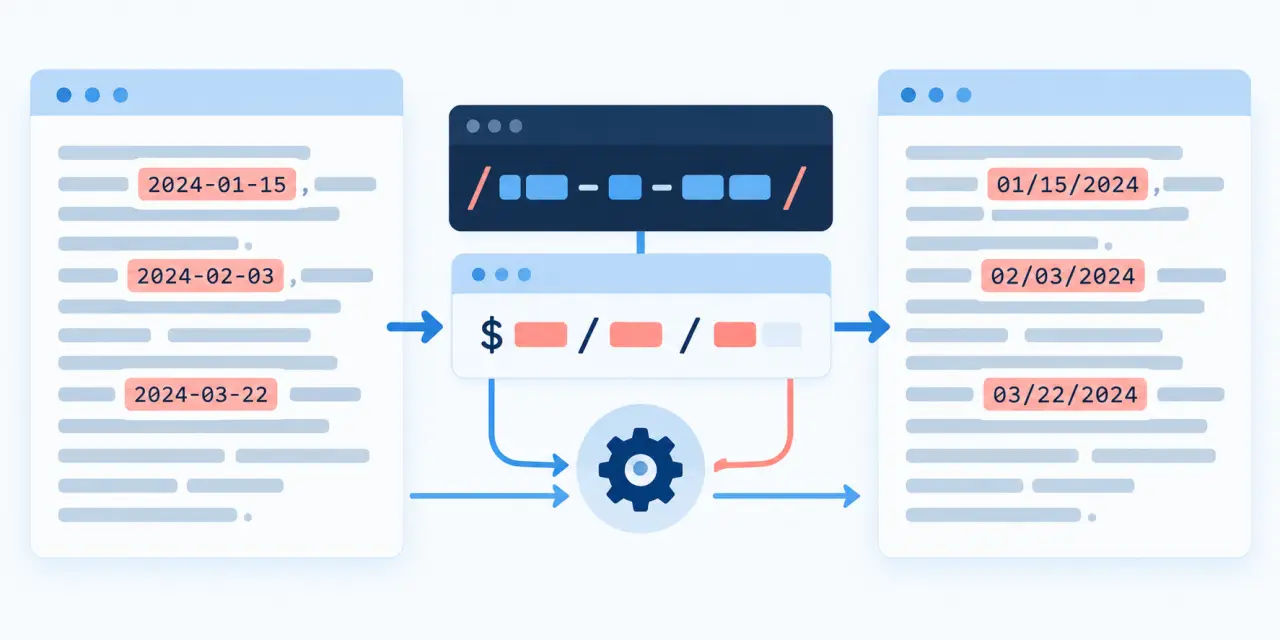
4. Convert an ISO date to a display date
Pattern: ^(\d{4})-(\d{2})-(\d{2})$. Replacement: \2/\3/\1. Apply this only to known date fields, not arbitrary prose.
5. Remove a tracking query from a URL
Pattern: [?&](utm_[^=]+|ref)=[^&]*. Replacement: empty. Test URLs with more than one parameter because removing the first parameter can leave a second separator.
6. Turn a name into Last, First
Pattern: ^([^,]+),\s*(.+)$. Replacement: \2 \1. Keep a no-match branch because not every name has the same shape.
7. Replace a Markdown link label
Pattern: \[([^]]+)\]\(([^)]+)\). Replacement: \1 — \2. Use a Markdown parser for complex nested links.
8. Mask a phone suffix
Pattern: (\d{3})\d{4}(\d{4}). Replacement: \1****\2. Confirm the input country format before applying it to real user data.
9. Remove empty lines
Pattern: ^\s*$ with a multiline flag. Replacement: empty. This is a line operation; without the flag, the anchors will not behave as intended.
10. Add a prefix to each line
Pattern: ^ with a multiline flag. Replacement: - . It is handy for turning plain lines into a list, but inspect blank lines before saving.
A small test loop
- Keep the input visible. Do not test only the replacement field. You need to see the exact characters, line breaks, and punctuation that the pattern will consume.
- Check one and many matches. A pattern that works once may stop after the first match if the global or equivalent option is missing.
- Test the no-match case. The safest result is often the original text. Make sure a non-matching line is not accidentally deleted or partially changed.
- Read the replacement syntax. A backreference such as \1 may mean something different in another tool. Copy the smallest example into the real engine before doing a batch edit.
Questions people usually ask
What does regex replace do?
Use a small test set and check the engine-specific replacement rules.
Why use capture groups?
Use a small test set and check the engine-specific replacement rules.
How do I test a replacement safely?
Use a small test set and check the engine-specific replacement rules.
Does every regex engine use the same replacement syntax?
Use a small test set and check the engine-specific replacement rules.
Can regex replace parse HTML?
Use a small test set and check the engine-specific replacement rules.
For an interactive check, use RegexToolBox, then compare the final pattern with the engine documentation in your codebase. If you are working in Python, the Python regex replace examples are a useful next reference.
